Run the round.
Reassure the owner.
Get paid.
CorePaw Pro brings your schedule, clients, pet-care notes, GPS walks, owner updates and invoices into one field-ready app. It keeps working when the signal disappears, and sends the finished job back to the people waiting at home.
Full access for 30 days · No card · Unlimited clients and pets
Your business is split between WhatsApp, a calendar, notes and an invoice spreadsheet.
And it worked. When you had six dogs and one round, a group chat and a notebook were faster than any software — anyone who tells you otherwise has never run a book that small. It stops working somewhere around the point where you cannot remember whether Thursday's cancellation was inside the notice period, and month end takes an evening because the month is scattered across four apps that do not know about each other.
The round lives in a group chat
Pickup instructions, a gate code, "can you do Friday?" and a photo of a limp — all in the same scroll, none of it attached to the dog it is about.
The record is in your head
You know Willow can't go off lead. The person covering your holiday does not, and there is nowhere they could have read it.
Month end rebuilds the month
Counting walks out of a calendar, cross-checking a cancellation, typing an invoice, remembering who paid. Every month, from scratch.
One record, from the doorstep to the invoice.
Finish the walk once. The report and the invoice line both start from the same record, so nothing is entered twice and nothing falls between two apps.
Plan the day
Add the client, add their pet, set the service. One-off or repeating — "Bella, every Tuesday and Thursday" is set once.
Do the job
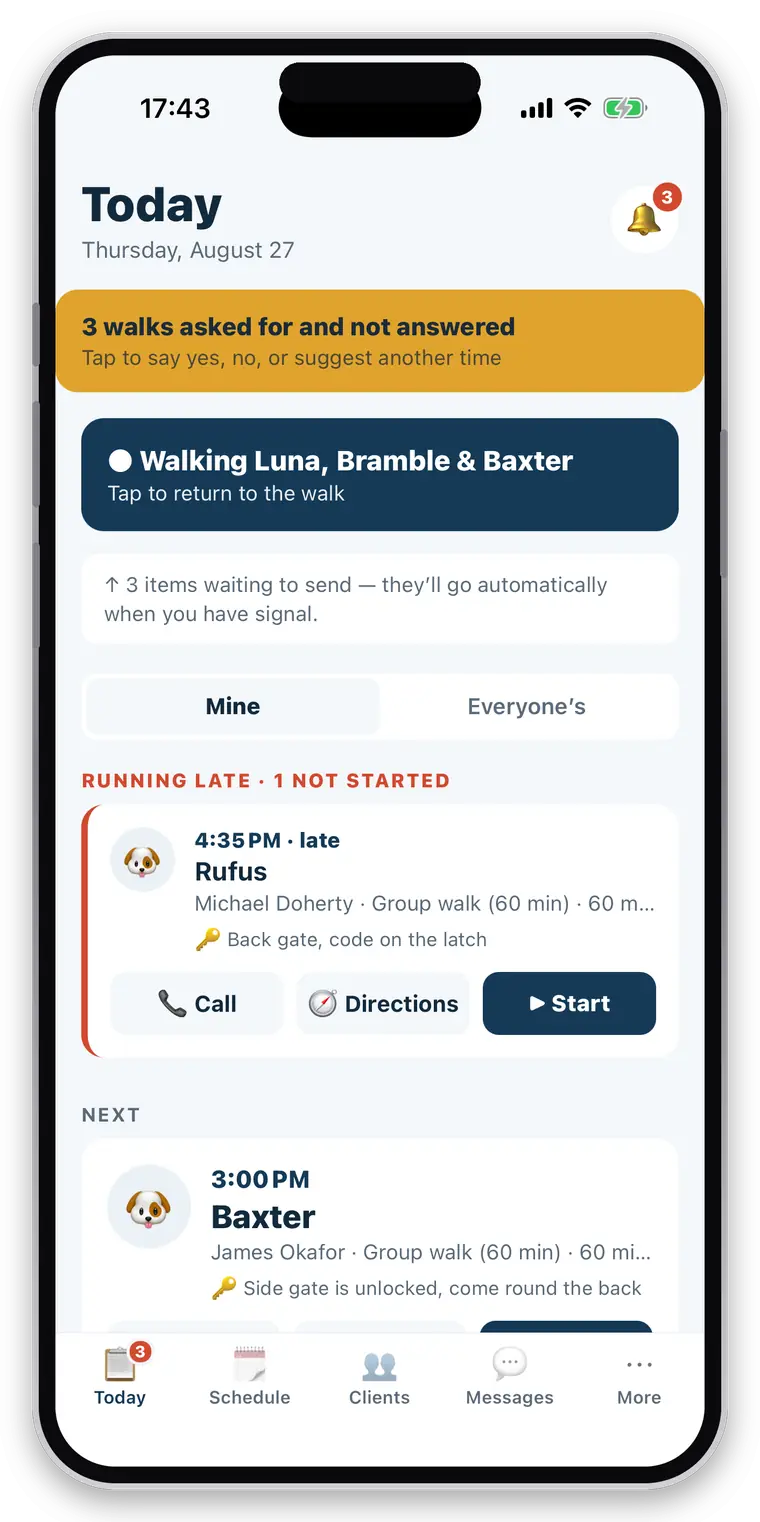
Today lists the round in order, late work first. One tap starts the walk; GPS records it with the phone in your pocket.
Reassure the owner
Collected and home safe land as notifications. The written report and the photos follow when you finish.
Invoice the work
Completed work is already priced and waiting. Run the month for every client at once, or invoice one.
See the next pickup before you leave the van.
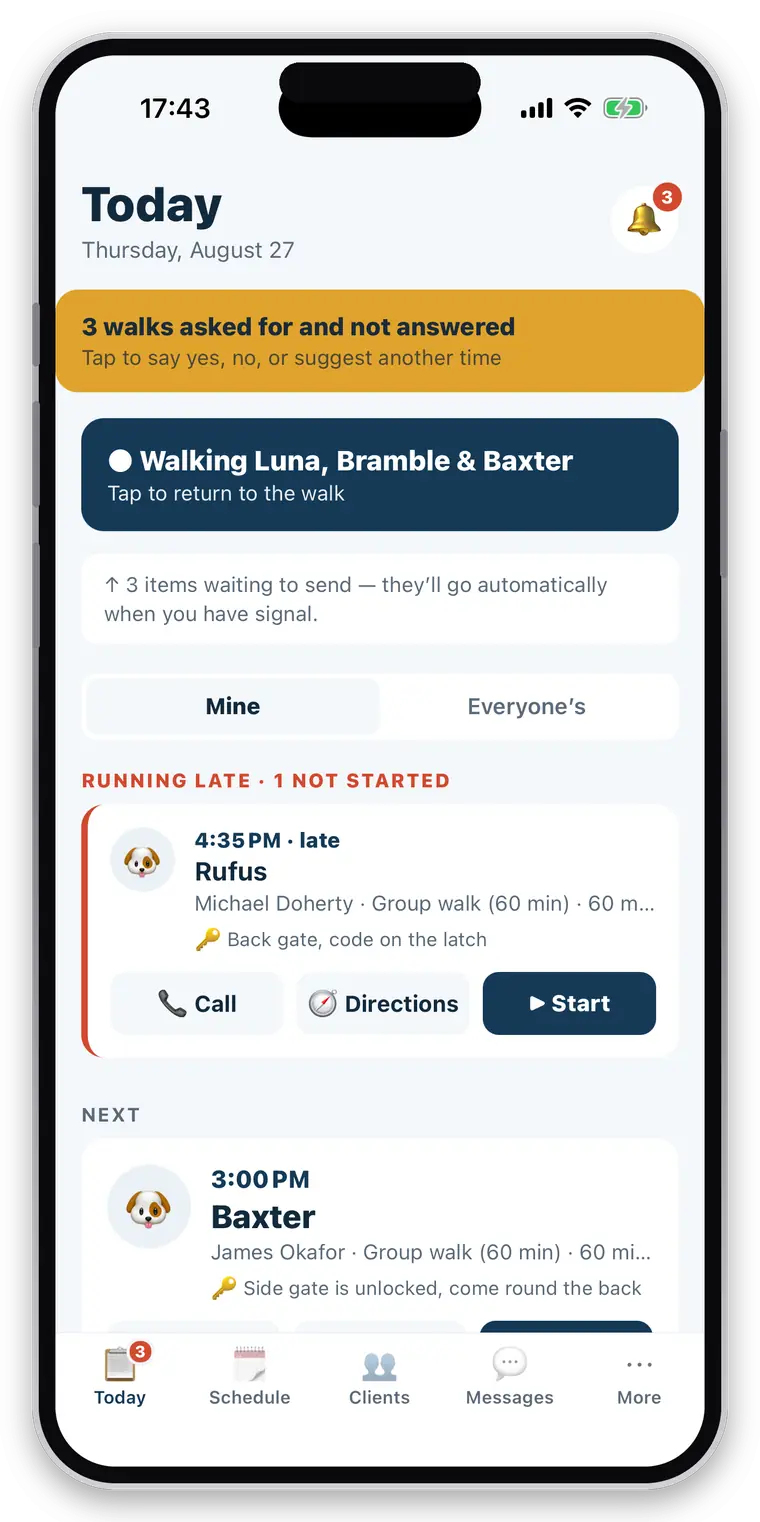
The screen you open twenty times a day answers one question — what am I doing next — and puts the thing you are late for at the top rather than in date order.
- Today’s jobs in the order you will do them
- Anything running late surfaced first, not buried
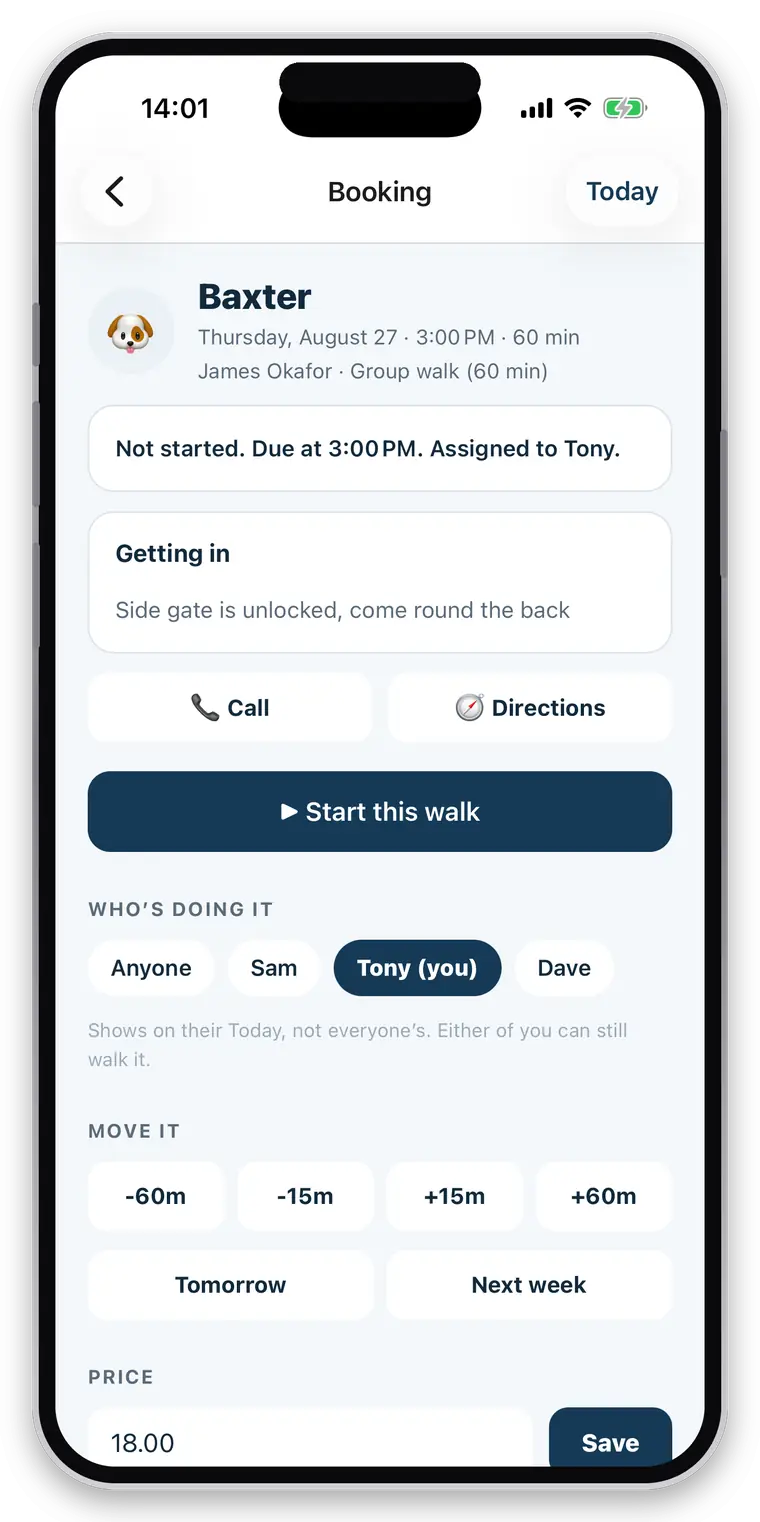
- The next pickup, with the address and the gate instructions
- Call, directions and start, without opening the booking
- A walk still running? Resume it from the top of the screen
Record the job with a lead in your other hand.
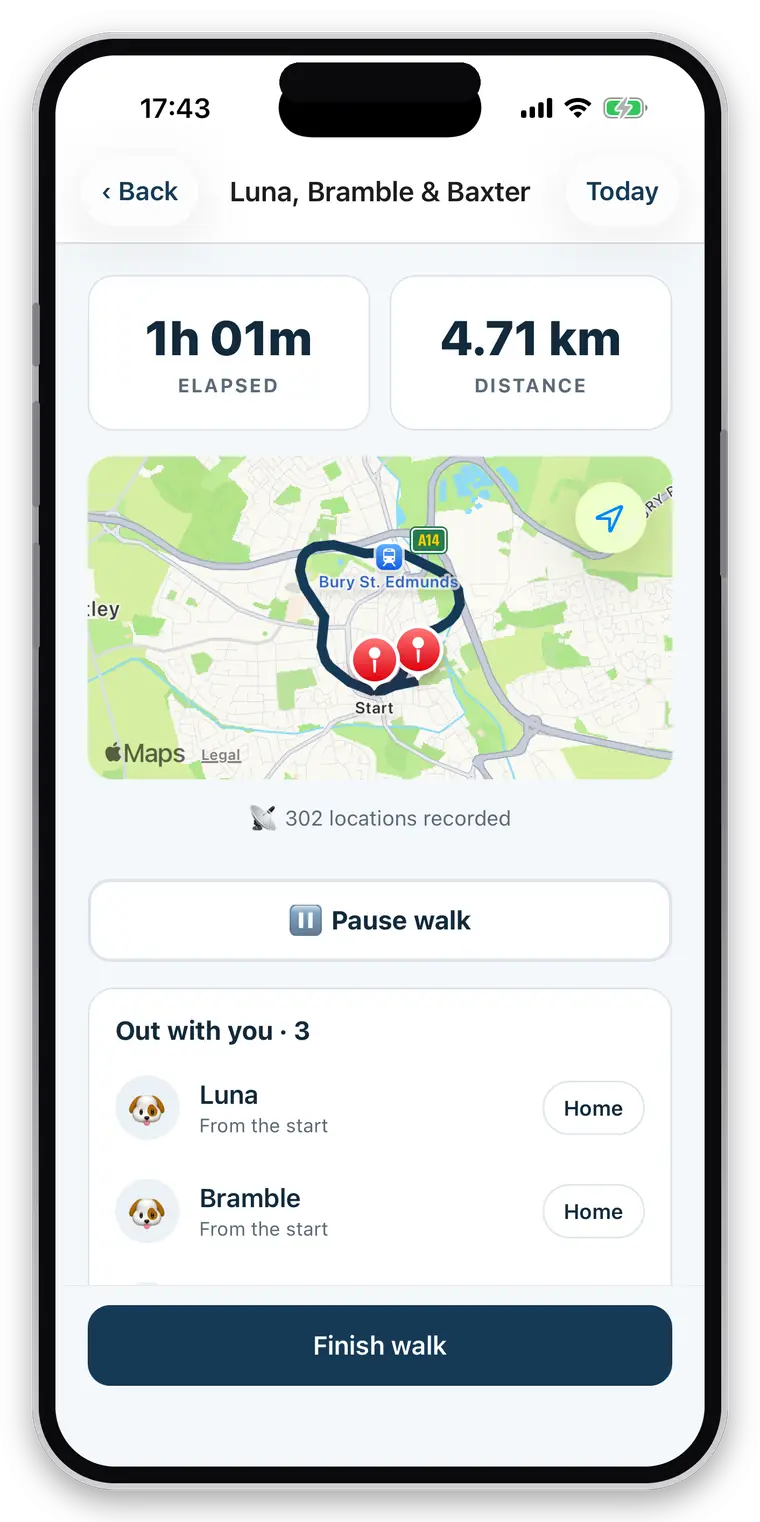
Start it, put the phone away, and let it run. A drop-in visit works the same way without a route, because a cat sitting is the same business with a different animal in it.
- Background GPS — keeps recording with the screen off
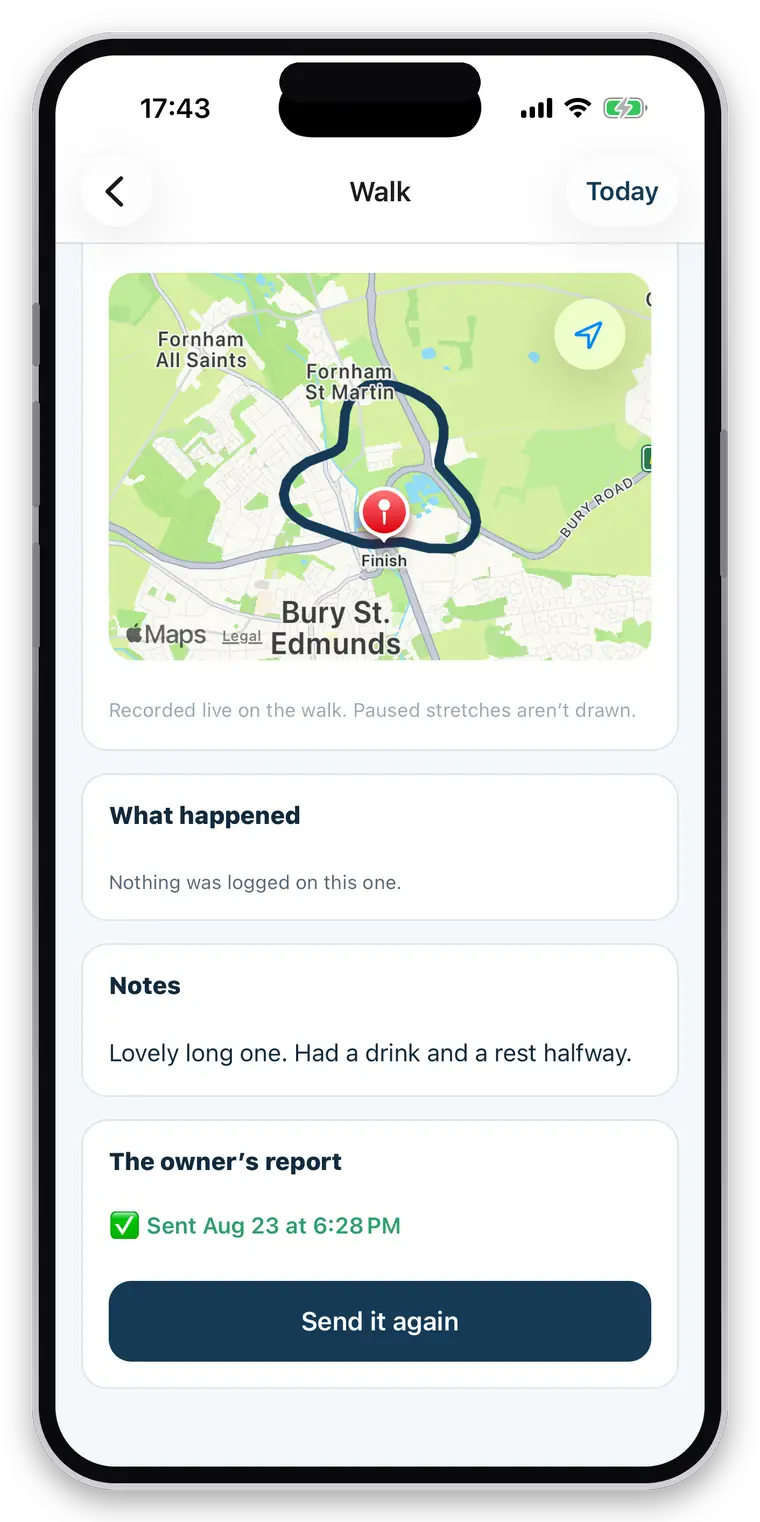
- Distance, duration and the route map
- Group walks: several dogs out together, one record each
- Pause and resume — paused time and distance are not counted
- GPS spikes filtered out, so a bad fix never adds a kilometre to a bill
- Route quality flagged honestly when there is too little to judge
- Collected and home safe notifications, each timestamped
The update the owner screenshots and sends to their mum.
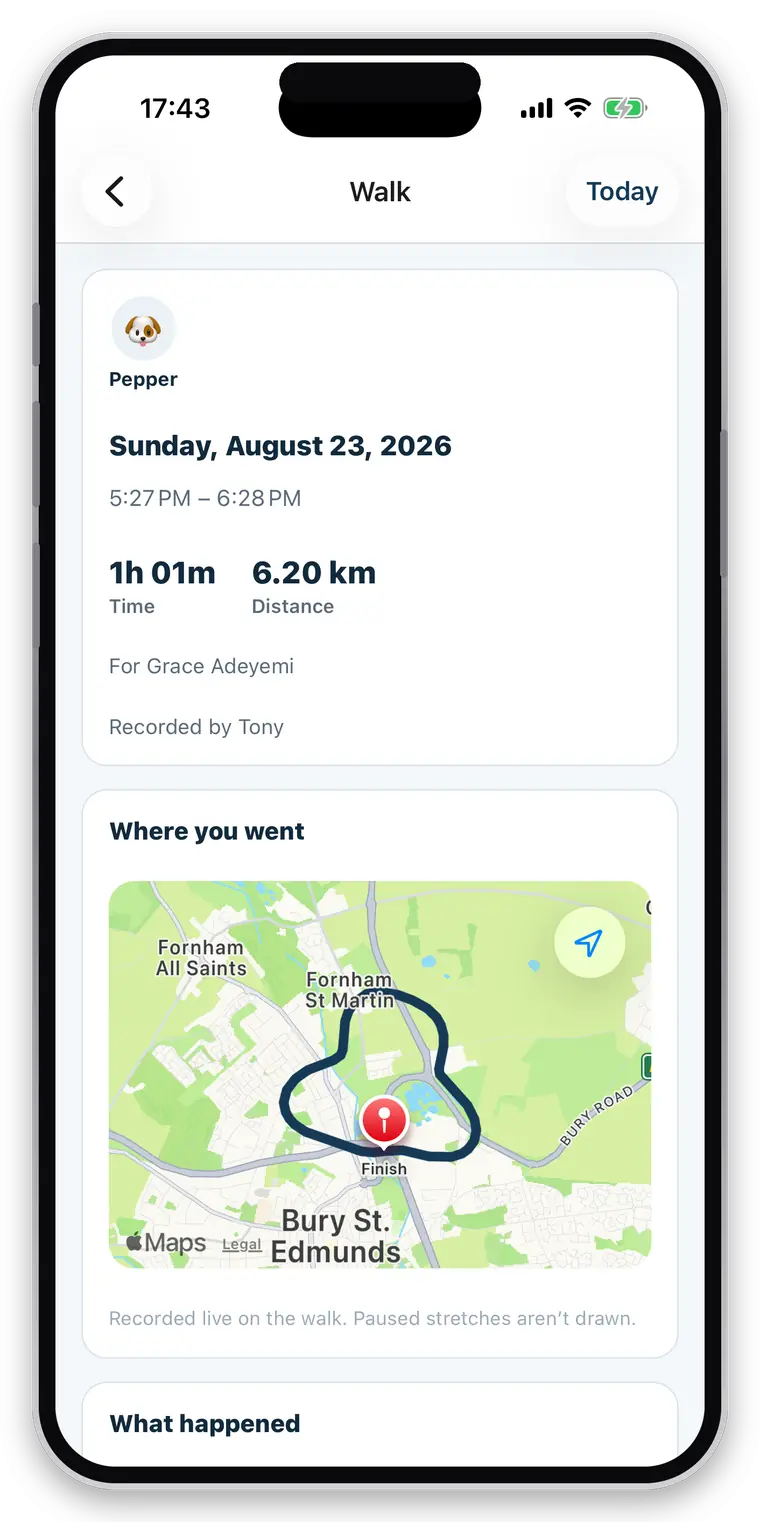
Every job ends with a written report built from the events you actually logged — never from anything nobody checked. It goes out with the route and the photos while you are walking back to the van.
- Written from the events logged on the job, and nothing else
- Photos attached to the walk or visit they came from
- Water, toilet, treats, feeding, medication, behaviour, injury and sickness where recorded and permitted
- Absences phrased as absences — “no health concerns were logged”, never “no signs of illness”
- Never a diagnosis, a reassurance or a health judgement
- Delivery status on every report, and a resend button when one fails
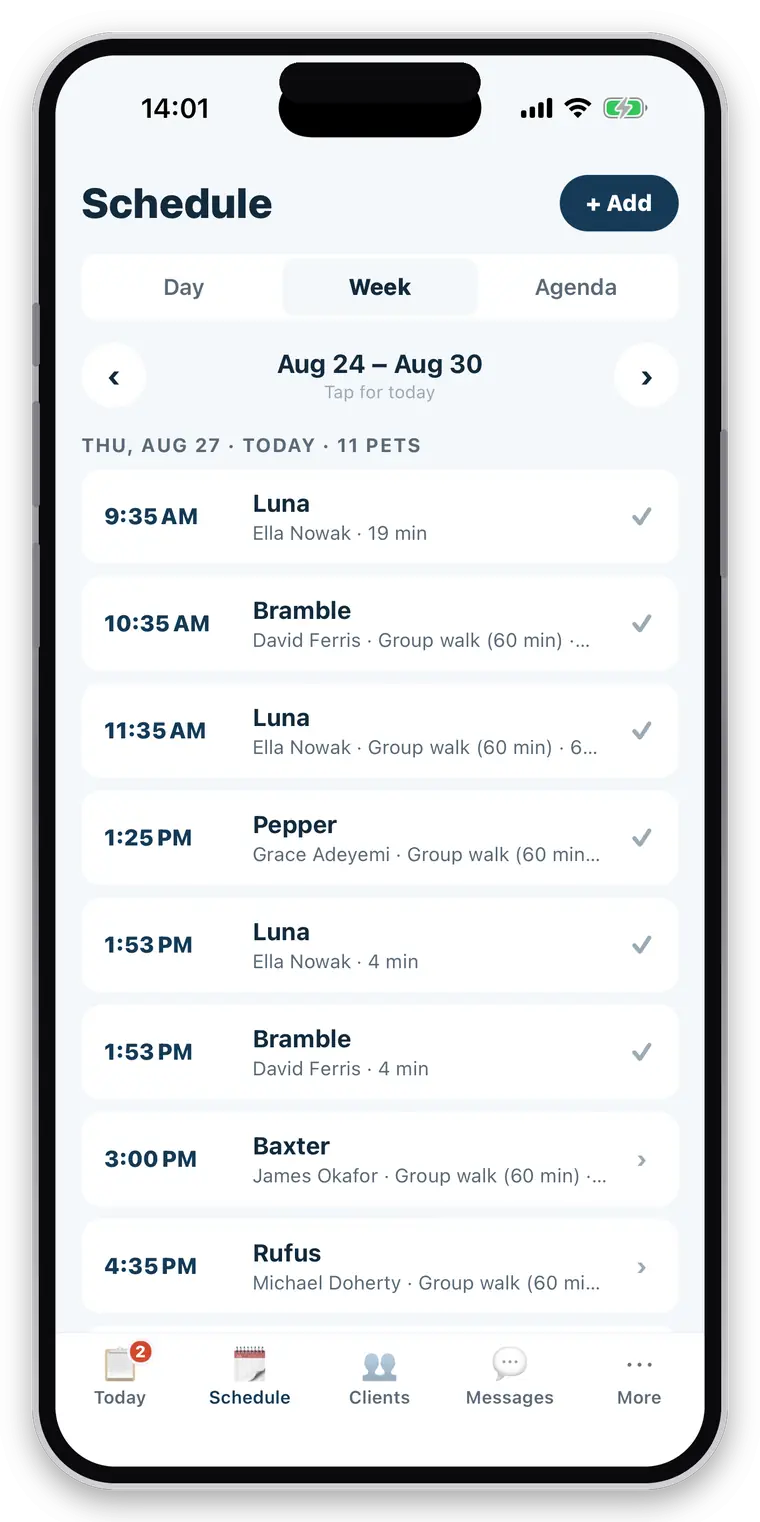
“Every Tuesday and Thursday” is set once.
Most of a round repeats. Set the pattern, and the rest of the year is already in the diary — with the one-offs, the requests and the changes handled where they happen.
- One-off and recurring bookings, in day or week view
- Group bookings — several dogs on one job
- Assign work to a member of your team
- Owners can request a booking from CorePaw
- Accept, decline, or propose a different time
- Reschedule and cancel from either side
- Late cancellations charge your fee, straight onto the next invoice
- Overlap warnings when you book — a warning, never a block
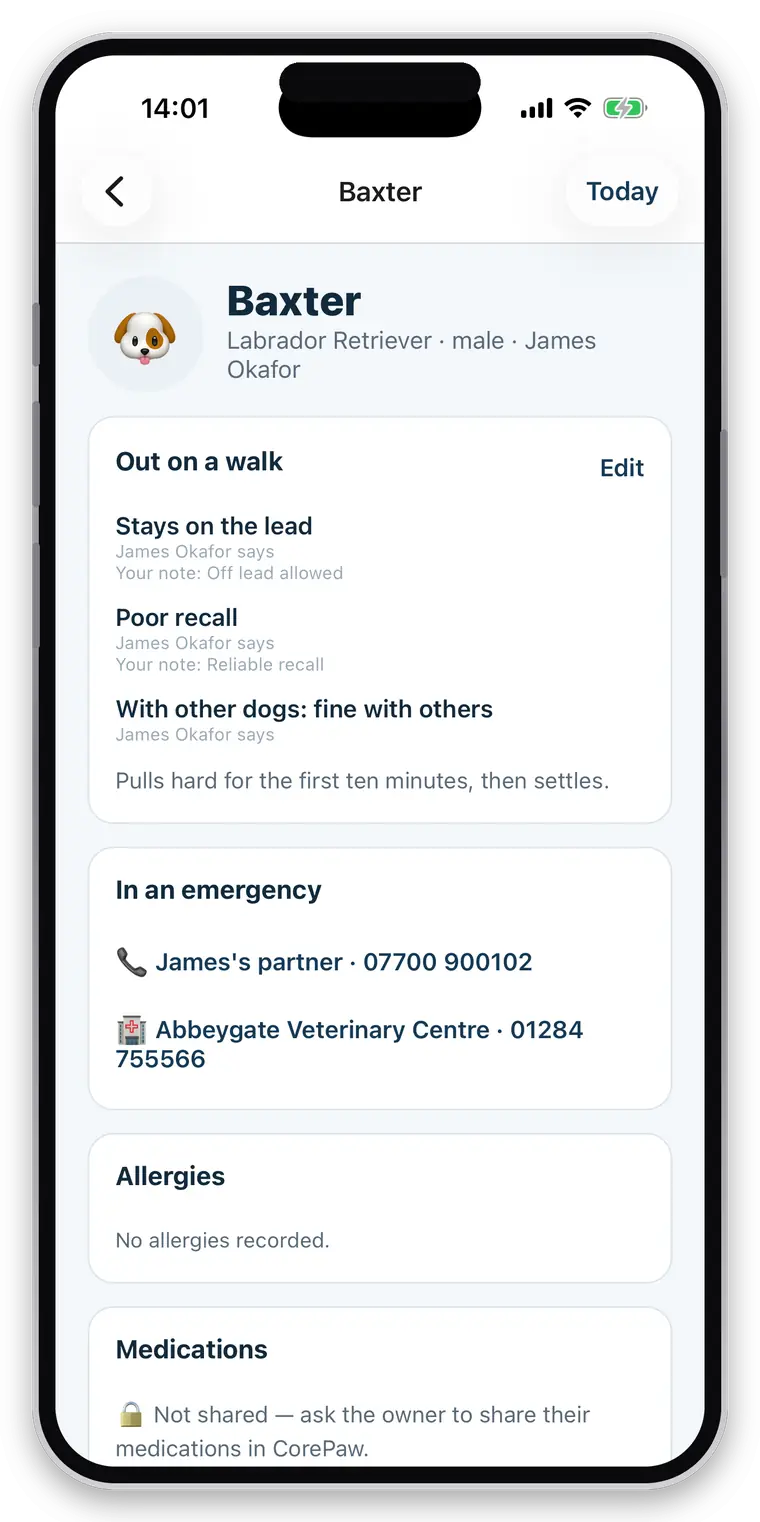
Everything the person covering your round would need to ask you.
The side gate, the emergency contact, the vet, whether she can go off the lead. Written down once, where anyone you trust with the job can read it at the doorstep.
- Contact details, address and pickup instructions
- Emergency contact and vet practice, never behind an extra tap
- Feeding and care instructions for visits
- Photo, breed, age and sex
- Recall, off lead, sociability, handling and medication consent
- Allergies, medications and health information where the owner has shared them
“Not shared” never looks like “nothing to report”.
Where an owner has not granted access, you see a locked card that says so. An empty allergy list read as no allergies is the most dangerous thing this app could show you, so it never renders one.
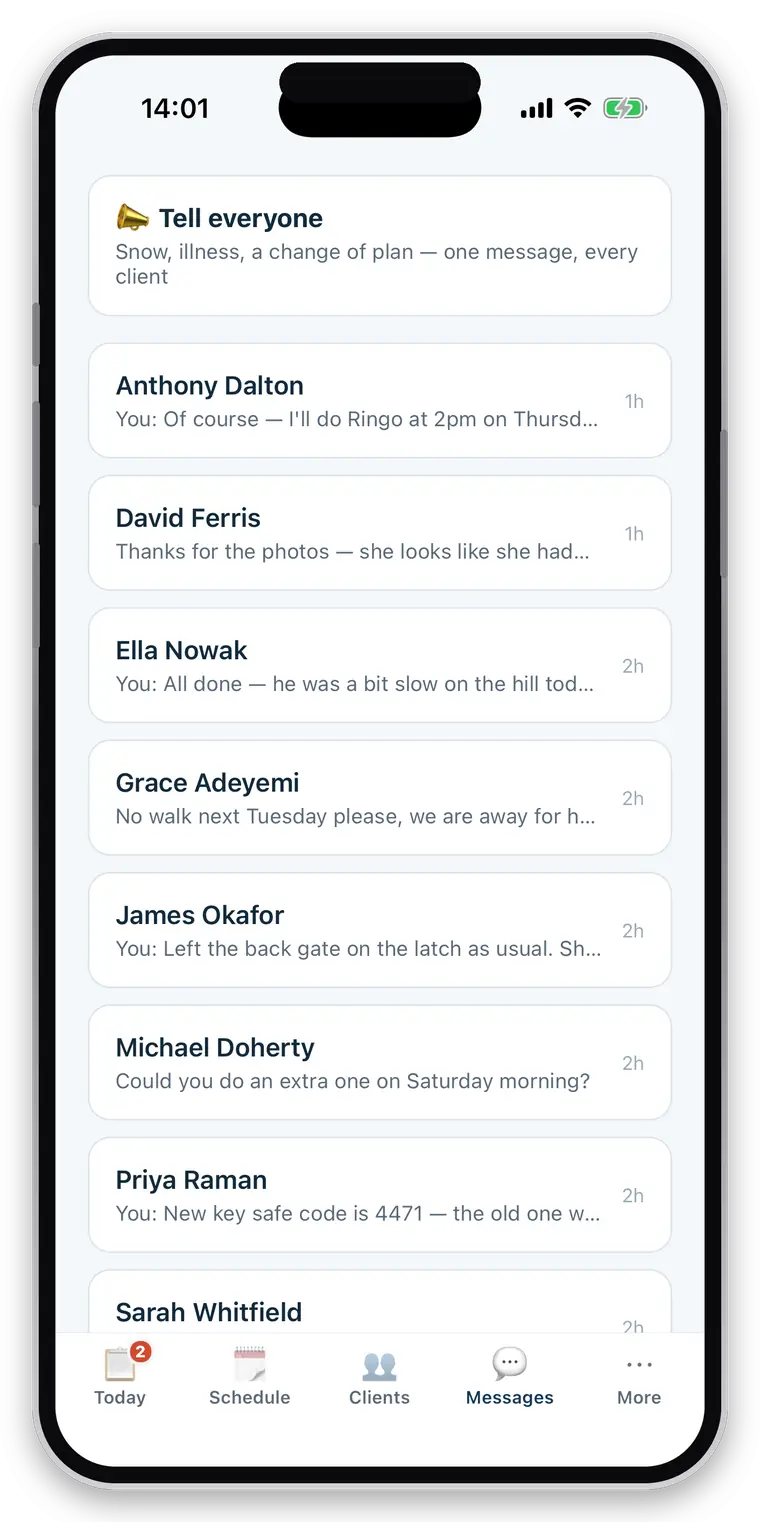
One thread per client, attached to the dog it is about.
The conversation belongs to the business rather than to whichever phone number happened to answer — so taking on a partner does not mean forwarding two years of texts.
- One thread per client, with photos
- Unread markers, so nothing sits unanswered for a day
- Broadcast to every client at once — “snow tomorrow, no walks”
- Booking and owner notifications in the same place
- Free for the owner, always
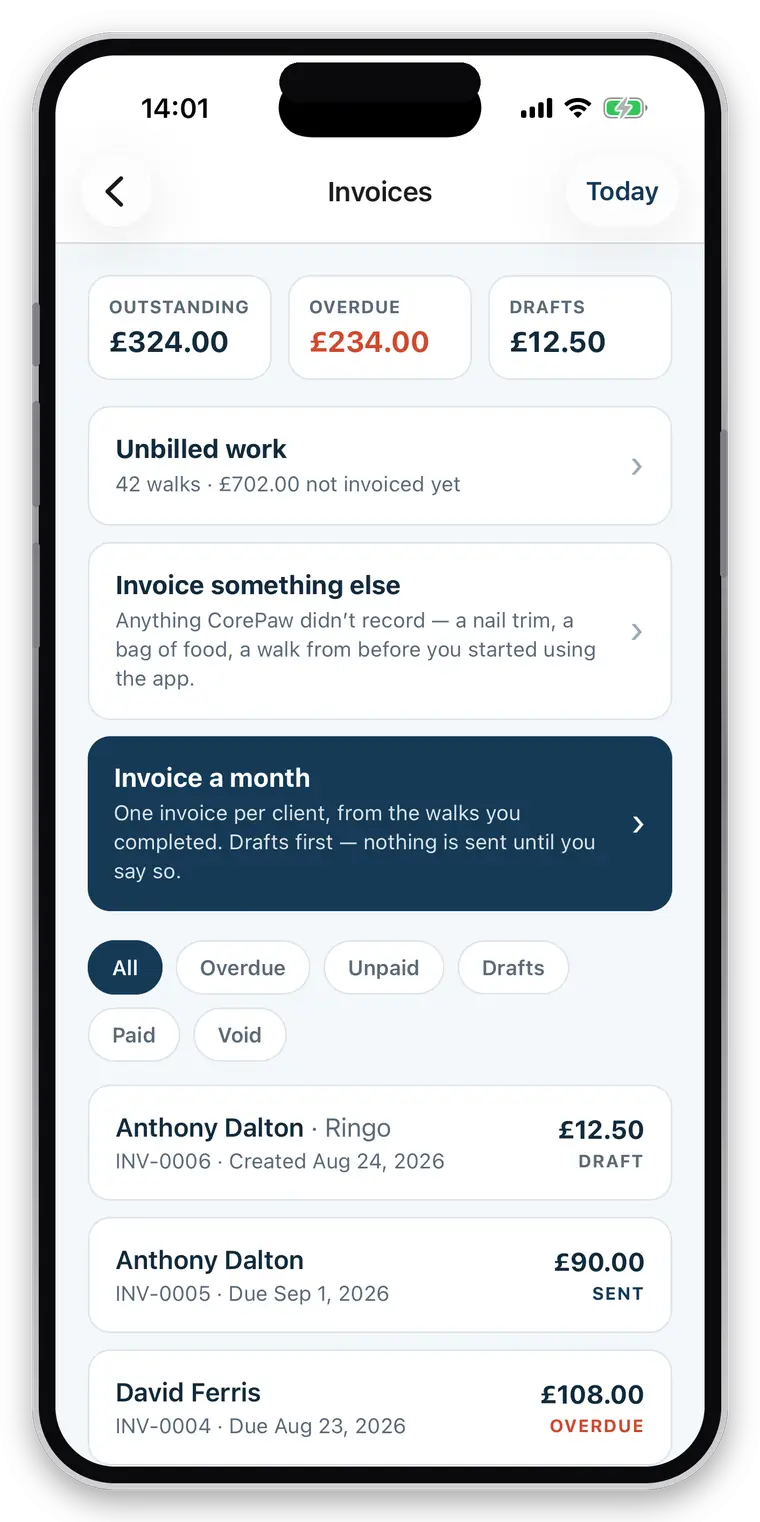
Invoice the month’s completed work without rebuilding it from a calendar.
Every completed job is already priced and waiting. Run the whole book at month end, or invoice one client, or type an invoice for work the app never saw.
- Completed work becomes invoice lines automatically
- Bulk month-end run across every client at once
- Manual invoices for ad-hoc work — a nail trim, a bag of food, a key-cutting fee
- Sequential numbering with your own prefix, issued centrally so there are no gaps
- Edit the draft before it goes; a numbered invoice can never be left empty
- VAT and UTR, shown only when you have filled them in
- 27 supported currencies, stamped onto the invoice when it is issued
- Branded PDFs with your logo, address and terms
- Bank, PayPal and payment-link details printed on every invoice
- Emailed to the client from your name, with your address as reply-to
- Outstanding, overdue, paid and void — plus a payment history
- Optional automated reminders: never before the due date, never more than three
- Late-cancellation fees carried through as billable work
CorePaw never touches the money.
Your client pays you directly, into your account or through your own payment link. There is no platform cut, no payout schedule and nobody sitting between you and your income.
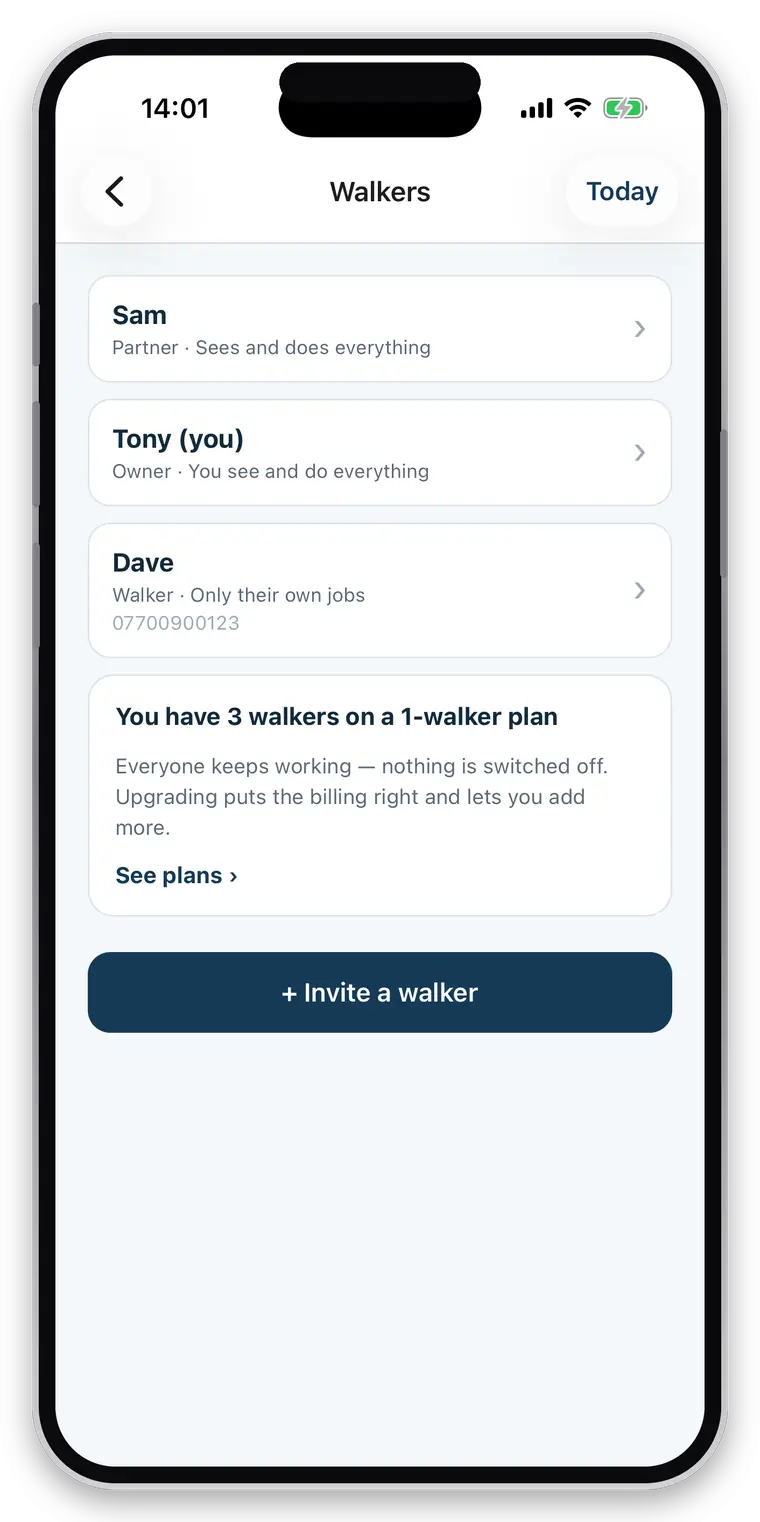
A business of one, a couple, or a team with employees.
Everything hangs off the business rather than a person, so a solo walker is simply a business of one — and adding your partner later changes a setting, not your data.
- Solo businesses: nothing about a team is in your way
- Full-access partners — the couple running a round together
- Restricted employees with their own accounts
- Assign any job to any walker
- Role and permission controls: clients, schedule, money
- Per-pet visibility — an employee sees only what they are working on
- Every walk records who actually did it, on the report and in your history
No signal in the park? The walk stays on your phone and sends when you reconnect.
Every tap during a job is written to the phone before anything else happens and reported as done — because it is done. The queue empties itself when you are back in range, oldest first, so a photo never arrives before the walk it belongs to.
- Walks, visits, events and photos write to the phone first
- Work queues and sends itself when a connection returns
- Force-quit mid-walk? It offers to resume, with nothing lost
- A failed report is retried rather than silently dropped
One honest exception: invoicing.
Creating an invoice needs a connection, and says so. Invoice numbers are allocated centrally and in order, and a VAT-registered business must not have gaps in that sequence — so the app will not guess a number offline and hope.
Your clients already have the other half.
CorePaw Pro is the business app. CorePaw is the free app your clients use for their own pets — and it is where your reports, photos and messages land. One backend, two apps, no second app for the owner to install.
- Owners receive reports, photos and pickup notifications through CorePaw
- Owners can request jobs and message you from there
- Walks flow into the pet's own history, alongside their weight and health record
- Owners choose, per pet and per area, what your business may see
- Everything on the owner's side is free, permanently — never behind their paywall
- Add a pet for an owner who has never heard of CorePaw; it is waiting for them when they sign up
Priced by how many walkers you have. Never per client, never per pet.
Your client book can double without your bill moving. What changes the price is how many people are out working — because that is what actually costs us anything.
Solo
One walker — you
£14.99/month
or £149.99 a year — 2 months free
A one-person round, with nothing about a team in your way.
Team
Most teamsUp to 4 walkers
£24.99/month
or £249.99 a year — 2 months free
A partnership, or a small team with employees on restricted access.
Business
Up to 10 walkers
£39.99/month
or £399.99 a year — 2 months free
A growing round with staff, assignment and per-person attribution.
- Unlimited clients and unlimited pets, on every plan
- Every feature in every plan — there is no cut-down tier
- A 30-day trial with nothing crippled, and no card
- Owners never pay to receive your reports or message you
- No percentage taken from what your clients pay you
Bands, not a charge per head
You buy the band that covers your team, so taking somebody on for a fortnight’s holiday cover does not move your bill. Hiring stops being a number you have to think about — until you outgrow the band, and then you move up one.
A 30-day trial, because that is where the payoff is
The first walk report lands on day one. The part that actually changes your week — a month’s completed work invoiced in one run — only happens at month end. A fortnight’s trial stops before you get to it, so ours covers a full billing cycle.
Wondering how that sits against the others? What pet-care software costs — price only, sourced and dated.
WhatsApp, a calendar and a spreadsheet.
Not a swipe at how you work now — it is how nearly every pet-care business starts, and it is genuinely faster until it isn't. This is what changes when the four things know about each other.
| Job to be done | WhatsApp + calendar + spreadsheet | CorePaw Pro |
|---|---|---|
| Knowing today’s round | Scroll a calendar, cross-check the chat | One screen, in order, late work first |
| Pickup instructions and gate notes | Somewhere in a two-year message thread | On the client record, at the doorstep |
| Whether the dog can go off lead | In your head, or nowhere | On the pet record, visible to whoever covers |
| Proving a walk happened | A photo with a timestamp, if you remembered | Route, distance, duration and logged events |
| Telling the owner | Type it out, six times, at the end of the round | A written report goes when you finish the job |
| Knowing the report arrived | You don’t, until they say they never got it | Delivery status on every report, with resend |
| A late cancellation fee | An awkward conversation, usually skipped | Recorded on the booking, billed with the walks |
| Month-end invoicing | Rebuild the month, type each invoice | One run across every client with unbilled work |
| Sequential invoice numbers | A spreadsheet column and good intentions | Issued centrally, in order, with no gaps |
| Who hasn’t paid | Read down the bank statement | Outstanding, overdue and paid, at a glance |
| Bringing someone in to help | Forward two years of texts | Their own login, only what you allow |
| Losing signal in a park | Nothing saves, retype it later | Written to the phone, sent when you reconnect |
We do not compare CorePaw Pro against other pet-care software on features. Doing that honestly would mean testing every competitor on a real round, and we haven’t. Price is different — it is published and checkable — so there is a price-only comparison against My Pet Walker, Time To Pet, Pet Sitter Plus and Scout, with every figure sourced and dated.
Questions walkers and sitters actually ask
Who is CorePaw Pro for?
Professional dog walkers, pet sitters, cat sitters and drop-in carers — from a sole trader with eight clients to a couple running a round together or a small team with employees. It is a business tool: your clients, your round, your reports and your invoices. It is not the app your customers use; they use CorePaw, free.
Does it work for pet sitters as well as dog walkers?
Yes. A job can be a route-tracked walk or a drop-in visit with no route at all, and the app uses the right word for it — a cat has a visit, not a walk. Sitters log feeding, litter, water, medication, photos and notes, and the owner gets the same written report a walk produces.
Is there a free trial?
Yes — 30 days with every feature switched on. Thirty days rather than the usual fourteen is deliberate: a walker's value lands twice, once on the first walk report and again at month end when the invoicing run saves an evening. A shorter trial ends before the second one arrives.
Which plan do I need, and what if I go over it?
Plans are bands, not a per-head meter: Solo covers one walker, Team covers up to four, Business covers up to ten — including you. Every plan has every feature and unlimited clients and pets. If you add a walker beyond your band nothing switches off and nobody stops working; the app tells you the billing needs putting right. Above ten walkers there is no plan yet, so talk to us rather than guessing.
Is there a limit on clients or pets?
No. Unlimited clients, unlimited pets, unlimited bookings and unlimited walks on every plan. You pay by how many walkers your business has, never per client or per animal — capping the size of your client book to charge you more would be charging you for growing.
What happens when there is no signal?
The walk carries on. Everything you tap is written to your phone first and reported as done, because it is done — the queue empties itself when you come back into range. The one exception is invoicing, which needs a connection and says so, because invoice numbers are issued centrally and in order.
Do owners have to pay for CorePaw?
No. Reports, photos, route maps, pickup and drop-off notifications, messaging you and requesting a booking are free for owners, permanently. Nothing your business depends on ever sits behind the owner's paywall — if an owner could not book a walk because they would not pay a subscription, you would lose the booking, and you are the customer.
Does CorePaw take a percentage of what my clients pay me?
No, and it never touches the money. The invoice is a document; your client pays you directly, into your account, by your link. There is no platform cut, no payout schedule and no third party sitting between you and your income.
Can I create monthly invoices?
Yes. At month end, run the whole book at once: every client with unbilled completed work gets an invoice built from that work, with the walks and visits as line items. You are not rebuilding the month from a calendar and a group chat.
Can an owner restrict what I see?
Yes, per pet and per area. A household with two dogs can share one and not the other, and can share feeding but not medication. Where something has not been shared, the app shows a locked card saying so — never an empty list. "Not shared" and "nothing to report" must never look the same, because an empty allergy list read as "no allergies" is the most dangerous thing a walking app could show you.
Run next week through it.
Full access for 30 days, no card, unlimited clients and pets. A trial that ends before month end tells you nothing — this one covers a full billing cycle.
Full access for 30 days · No card · Unlimited clients and pets