Everything CorePaw Pro does, in the order your day does it.
Grouped by the working day rather than dumped in one grid. Everything on this page is built and working — what is deliberately not built is listed honestly at the bottom.
Full access for 30 days · No card · Unlimited clients and pets
Today, scheduling and booking requests
The round in the order you will do it, and the diary that fills itself in.
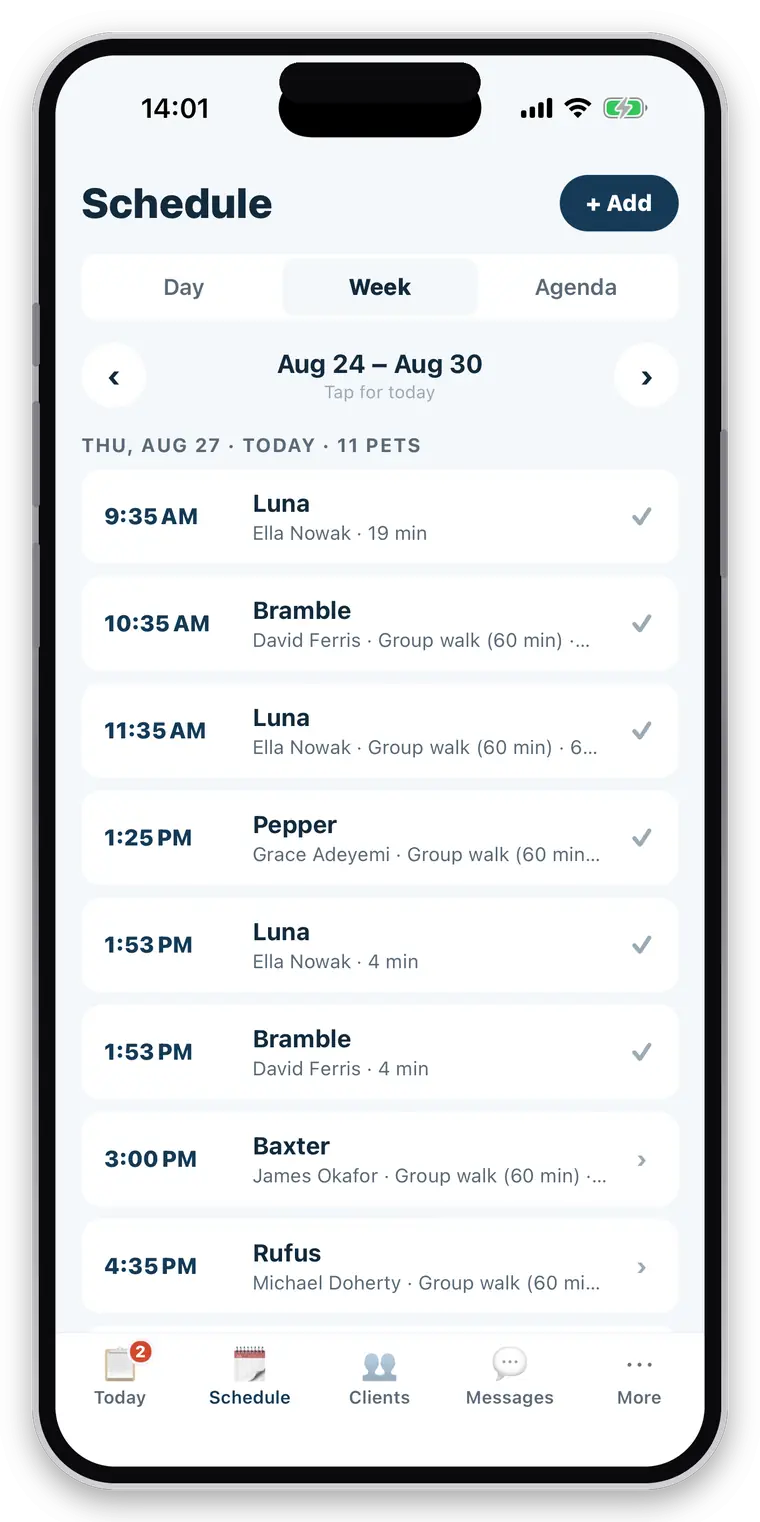
Today
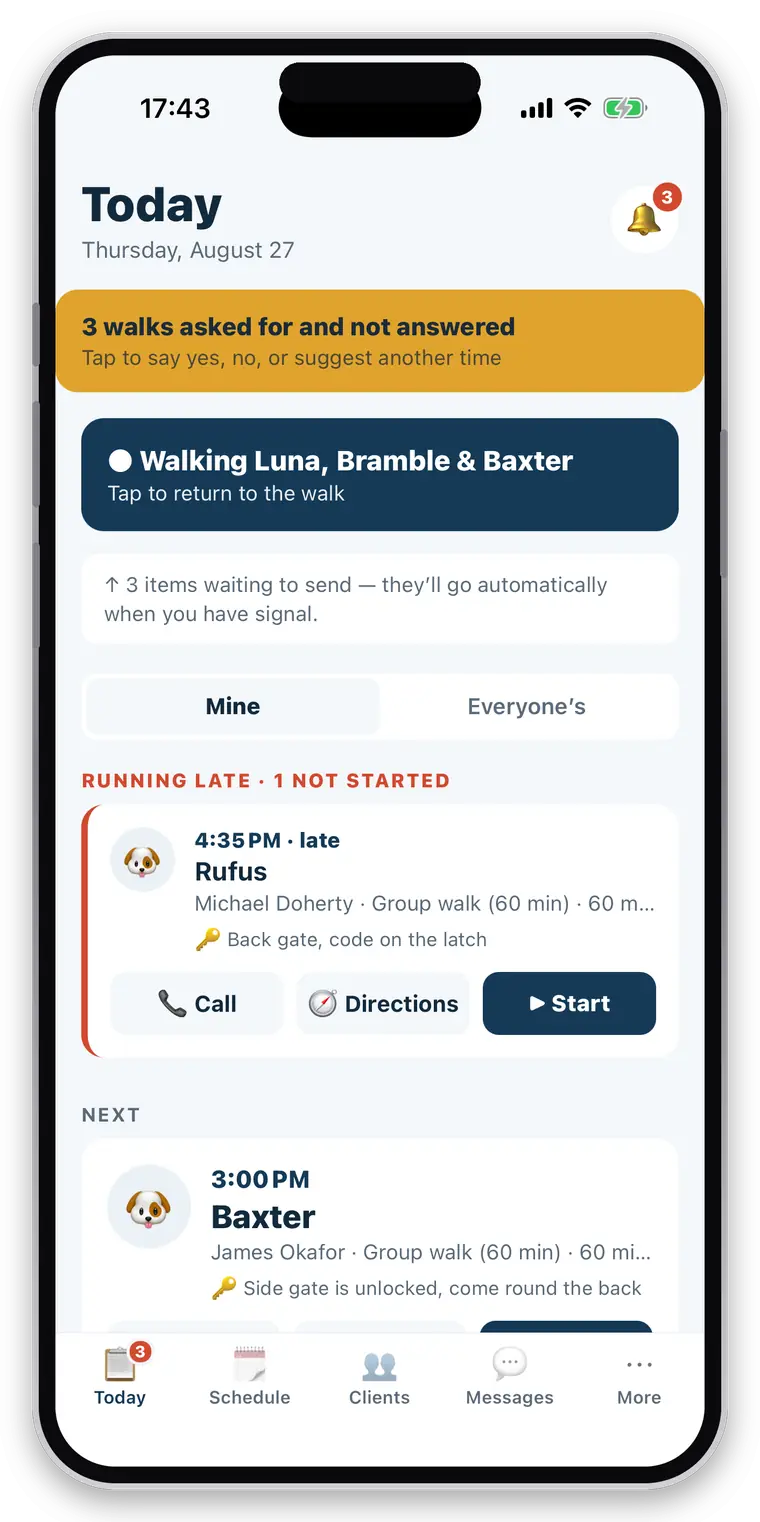
The round in order, with anything running late lifted to the top and the next pickup surfaced.
Doorstep actions
Call the client, open directions or start the job without opening the booking first.
Resume an active walk
A running walk stays at the top of the screen until you finish it.
One-off bookings
A single job, priced from your service list or set by hand.
Recurring bookings
“Bella, every Tuesday and Thursday” is set once and stays set.
Day and week views
The week at a glance, then one day in detail.
Group bookings
Several dogs on one job, each keeping its own record.
Staff assignment
Any booking can be given to any walker in your business.
Booking requests
Owners request a job from CorePaw; you get a notification.
Accept, decline or propose
Offer a different time and it bounces back for the owner to confirm.
Rescheduling and cancellation
From either side, with the owner notified.
Cancellation fees
Your notice period and your fee, recorded on the booking and billed with the work.
Overlap warnings
What else is already out over that slot — a warning, never a block.
Services and prices
Your own service list: 30-minute walk, hour walk, drop-in visit, whatever you sell.
Days off and holidays
Mark the days you are not working, with a reason your clients can read. Requests for those days are refused rather than left for you to decline on your day off.
Working days per service
A service can be offered on some days and not others — weekday-only day care, weekend-only sitting.
Named rounds
The same four dogs, the same walker, every Tuesday — saved once and reused rather than rebuilt from your whole client list each week.
GPS walks, drop-in visits and what happened on them
Recording built for someone outdoors with a lead in one hand and a phone in the other.
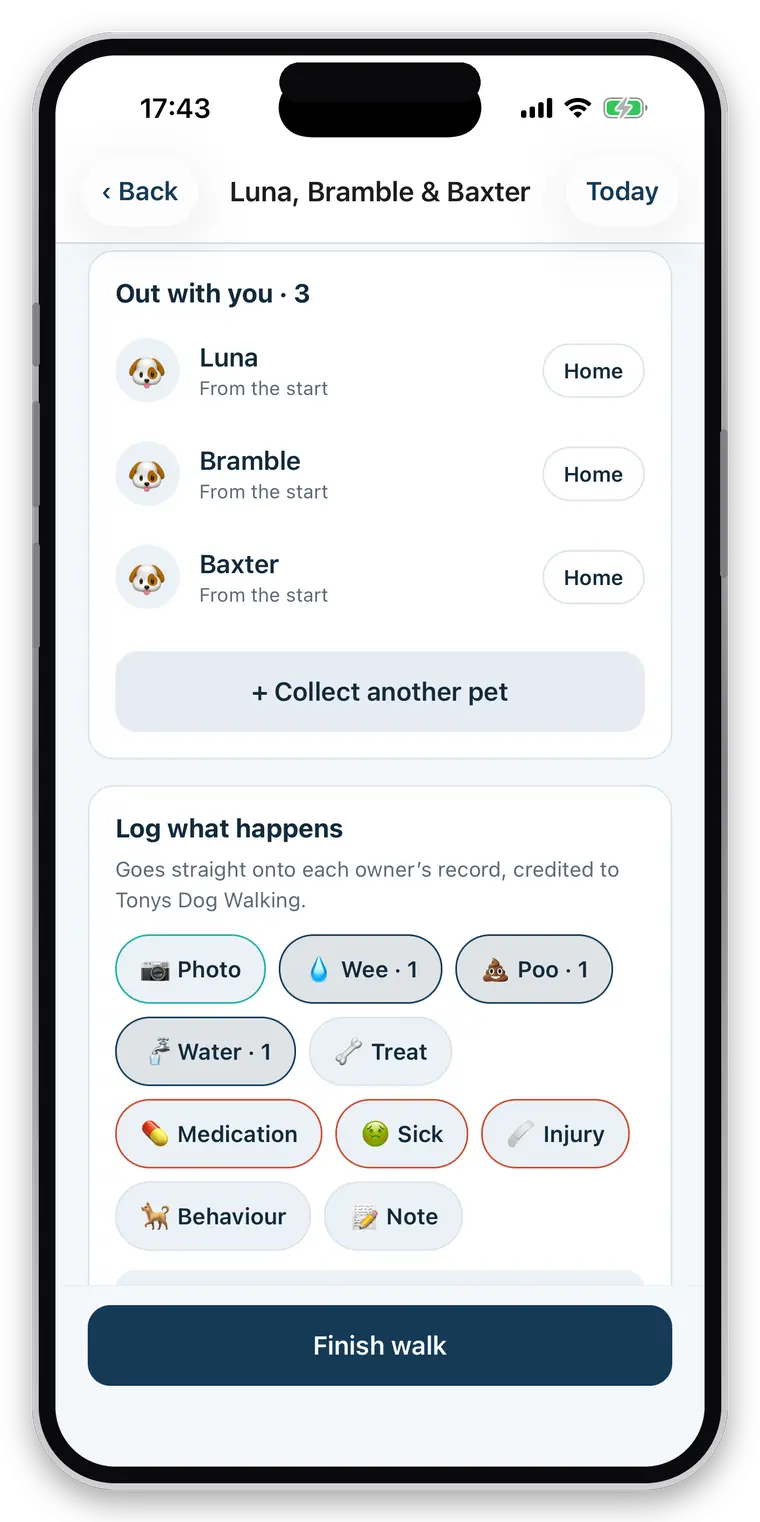
Background GPS
Recording continues with the screen off and the phone in your pocket.
Distance and duration
Measured from the filtered route, not from a raw point list.
GPS spike filtering
Vague fixes and impossible-speed legs are excluded, so one bad fix cannot add a kilometre to an invoice.
Route-quality handling
A route too sparse to judge says so, rather than quoting a confident wrong number.
Pause and resume
Paused time is not counted, and the paused stretch is not measured — a walker who paused and drove does not bill the drive.
Group walks
Pick the dogs at the start; one outing becomes one record for each of them.
Crash recovery
Force-quit mid-walk and it offers to resume, with nothing lost.
Drop-in visits
A job with no route at all, for cats and home visits.
Collected and home safe
One tap each, timestamped, each sending the owner a notification.
Walk and visit events
Water, toilet, treats, feeding, medication, behaviour notes, injury and sickness.
Photos
Taken on the job and attached to the job they came from.
Ad-hoc work
A walk started from the pet rather than the schedule is still recorded and still billable.
History
Every past walk and visit, searchable, with its route, events and report.
Walk attribution
Every job records who actually did it — on the owner’s report and in your own history.
The Walk Diary, reports and delivery
The polished artifact that ends the job, built from what you logged and nothing else.
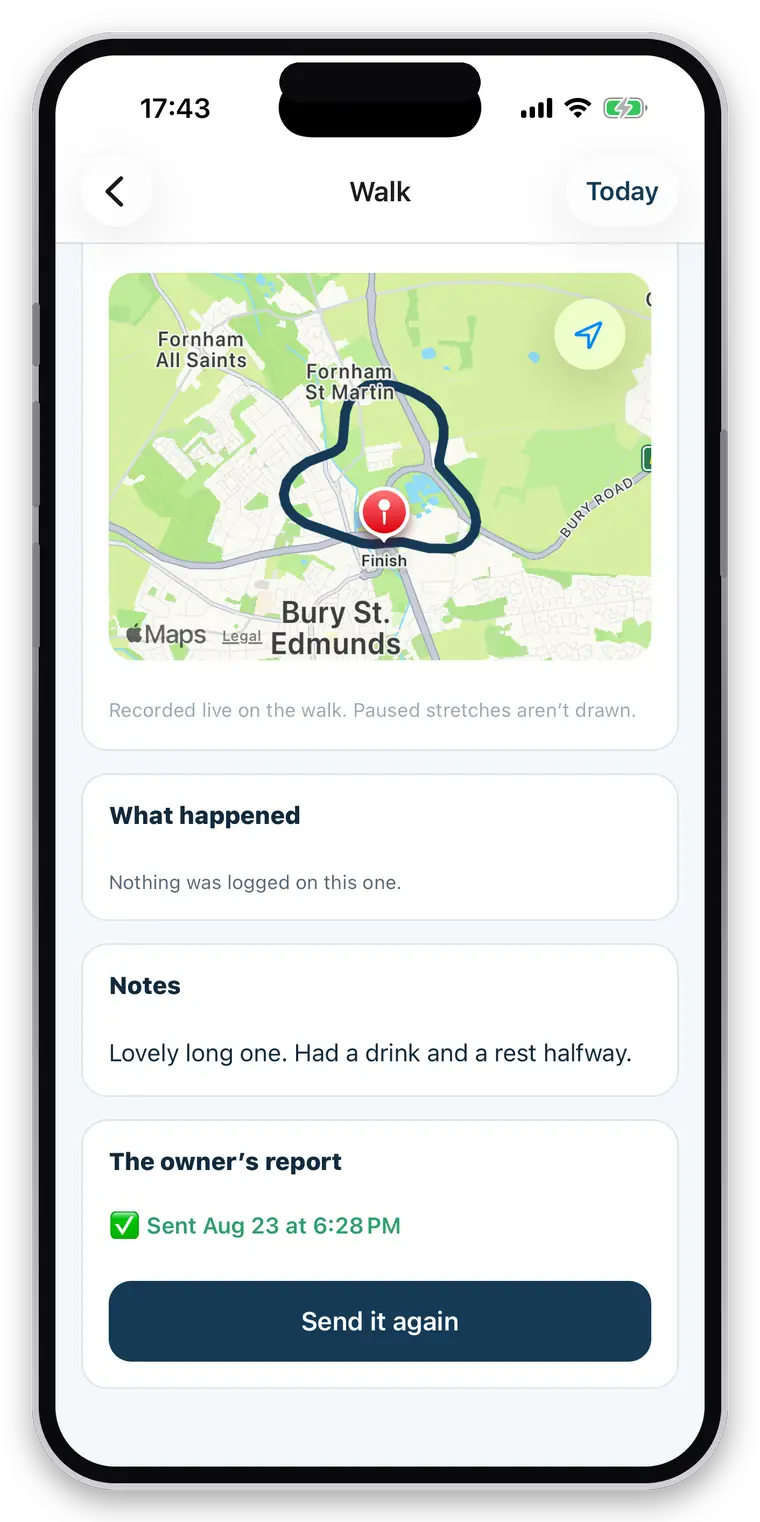
Automatic reports
Generated when you finish, from the events actually recorded on the job.
Route map and photos
The line you walked, and the pictures you took while walking it.
Care detail
Water, toilet, treats, feeding, medication, behaviour, injury and sickness, where recorded and permitted.
Constrained wording
The model narrates counts and timestamps. It never sees a photo, never speculates and never makes a health call.
Absences as absences
“No health concerns were logged” — never “no signs of illness”, because nobody examined the dog.
Plain fallback
If the model is unavailable the report still sends, written plainly from the same facts.
Delivery status
Sent, failed, or no email on file — recorded on the walk, with the recipients it reached.
Resend
A failed report can be sent again, and a report that already arrived is never sent twice by accident.
Into the pet’s history
The walk lands in the owner’s own record of their animal, not only in an email.
Clients, pets and permission-aware care records
What the person covering your round would have to ring you to ask.
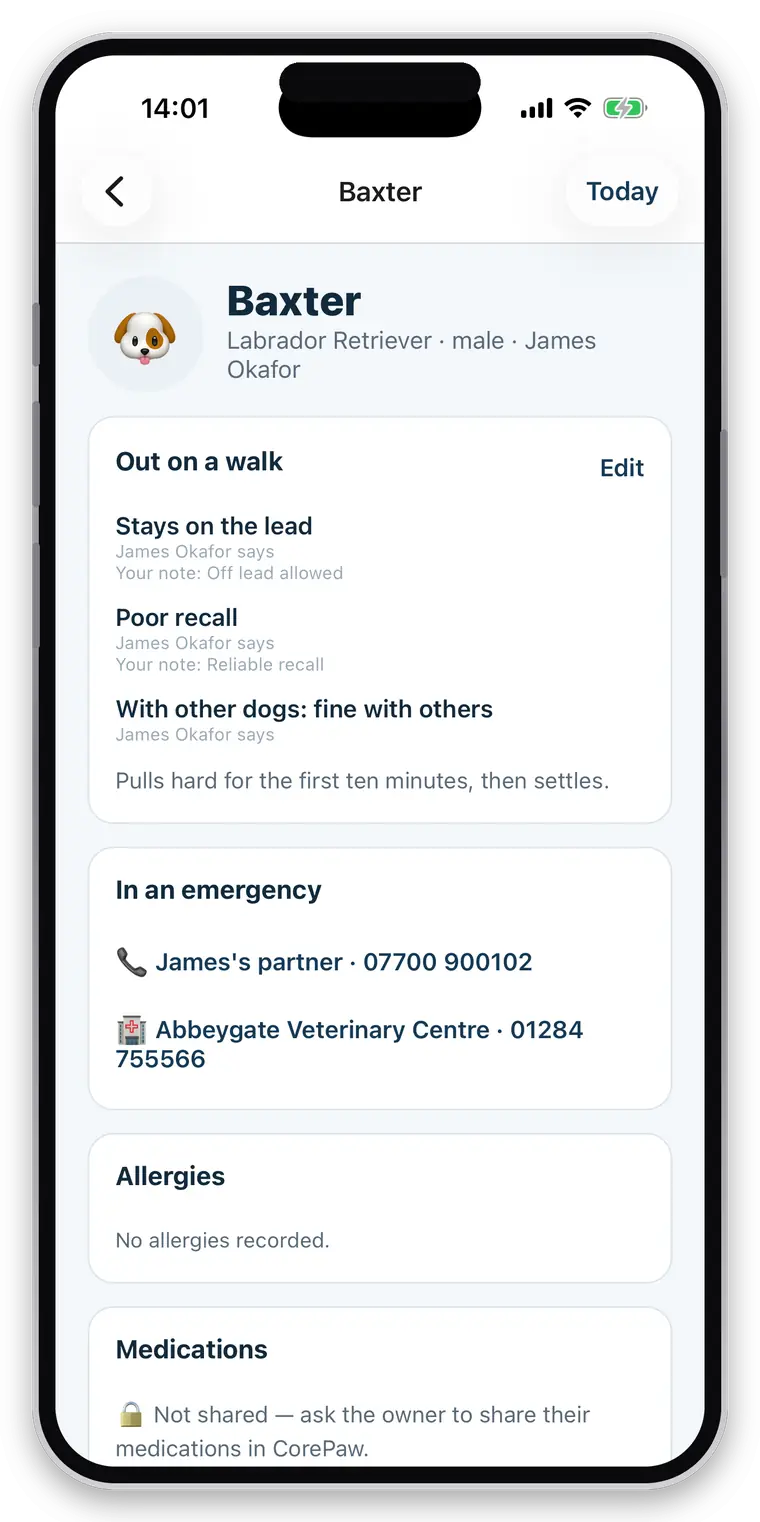
Client record
Name, phone, email and address, with more than one owner per household where there are two.
Pickup and drop-off instructions
“Side gate, don’t ring the bell.” Free text, on the card you read at the door.
Emergency contact
Never behind an extra tap — it is needed at the worst possible moment.
Vet practice and phone
Same reasoning.
Feeding and care instructions
What a sitter needs for a drop-in: portions, where the food is kept, and the routine the animal expects.
Pet profile
Photo, breed, age, sex, and the details the owner has filled in.
Handling and safety
Recall, off lead permitted, sociability with other animals, handling notes, treat and medication consent.
Health information
Allergies, medications and health notes — shown only where the owner has granted that area.
Locked, not empty
Where access was not granted you see a locked card saying so. “Not shared” never looks like “nothing to report”.
Species-aware
A cat is asked cat questions and is never offered a button to be let off the lead.
Ghost pet records
Add a pet for an owner who has never heard of CorePaw. It is waiting for them when they sign up.
Archived clients
When a relationship ends, private information goes and your invoices and totals stay.
Messaging, broadcasts and notifications
The conversation stays with the business and stays attached to the dog it is about.
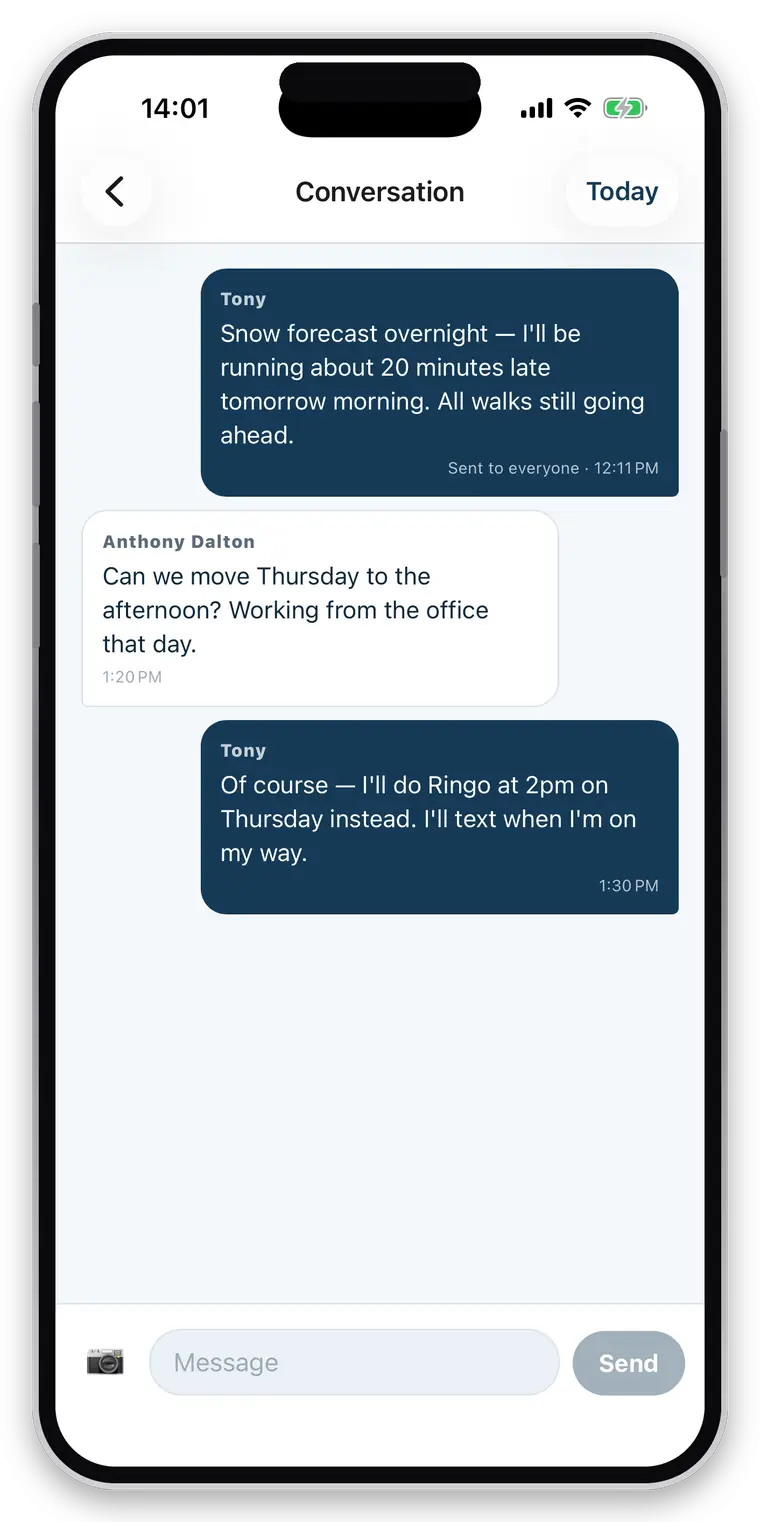
One thread per client
Not per pet and not per person — a household with two dogs has one conversation.
Photo messages
Send a picture without leaving the app or the thread.
Unread indicators
Per person, so a partner can see a message was already answered.
Broadcast announcements
“Snow tomorrow, no walks” to everyone at once; replies come back into each thread.
Booking notifications
Requests, acceptances, changes and cancellations, pushed to the right side.
Owner notifications
Collected, home safe, and the report itself.
Free for owners
Messaging you is never behind an owner subscription.
Invoicing, payments and chasing
From completed work to a numbered, branded PDF in the client’s inbox.
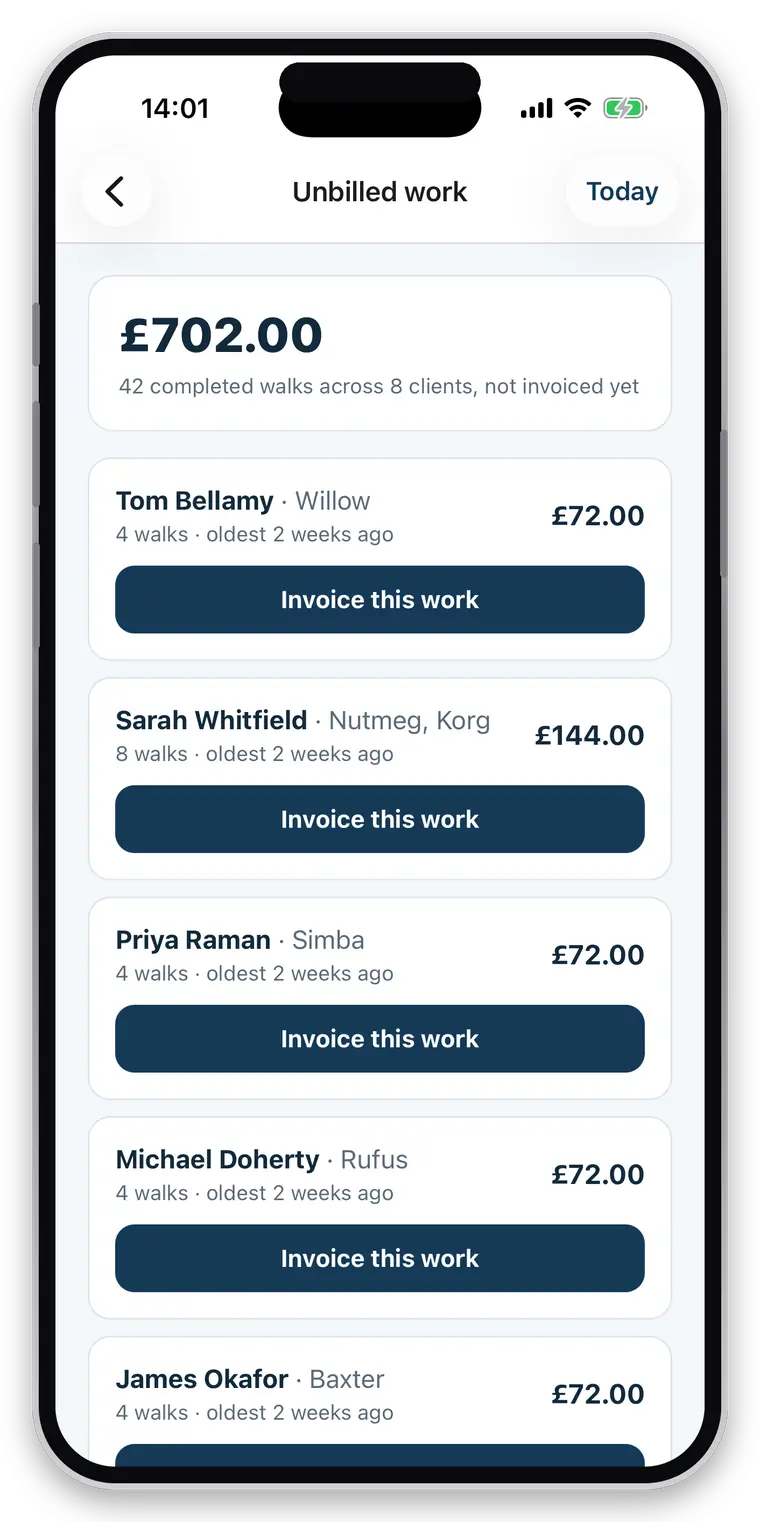
Unbilled work
Every completed job that has not been invoiced, per client, with a total.
Bulk month-end run
Invoice every client with unbilled work in one go.
Manual invoices
For work the app never saw — a nail trim, a bag of food, a key cutting fee.
Sequential numbering
Your prefix, issued centrally and in order. Two devices cannot collide and nothing skips.
No empty invoices
A number can never be burnt on an empty invoice, and a numbered invoice cannot be emptied afterwards.
Draft editing
Add, change or remove lines before it goes.
VAT
Your VAT number and rate, applied and shown — or absent entirely if you are not registered.
UTR and terms
Shown when filled in, hidden when not.
27 currencies
Stamped onto the invoice when it is issued, so changing yours never rewrites your history.
Branded PDFs
Your logo, business name, address and footer. Rendered on your phone, so the client gets the document you previewed.
Payment details
Bank name, account name, sort code, account number, PayPal, and any payment link you like.
Email delivery
Sent in your name with your address as reply-to, PDF attached.
Invoice states
Outstanding, overdue, paid and void, with the date and method of every payment.
Payment history
Cash, bank transfer, PayPal, card — recorded however you were actually paid.
Take card payments
Optional. Connect your own Stripe account and clients can save a card, so the walk is charged when it is finished rather than chased later.
The money is yours
Payments land in your Stripe balance, under your business name on the client’s statement, and Stripe pays you out. CorePaw takes no percentage — only Stripe’s own processing fee applies.
Your account, not ours
A standard Stripe account that belongs to you, with Stripe’s own dashboard and support. No card number ever touches CorePaw.
A declined card changes nothing
The work stays on your unbilled list and is invoiced at month end exactly as if cards had never been switched on.
“She paid me cash”
One tap on the day takes the charge back before it is taken, for the client who hands you a note at the door.
Automated reminders
Optional, off by default. Never before the due date, at most three, a week apart, then it stops.
Cancellation fees
Carried onto the invoice as billable work alongside the walks.
Business branding
Logo, address, contact details and invoice footer, set once.
Teams, roles and permissions
Everything hangs off the business, so a solo walker is a business of one.
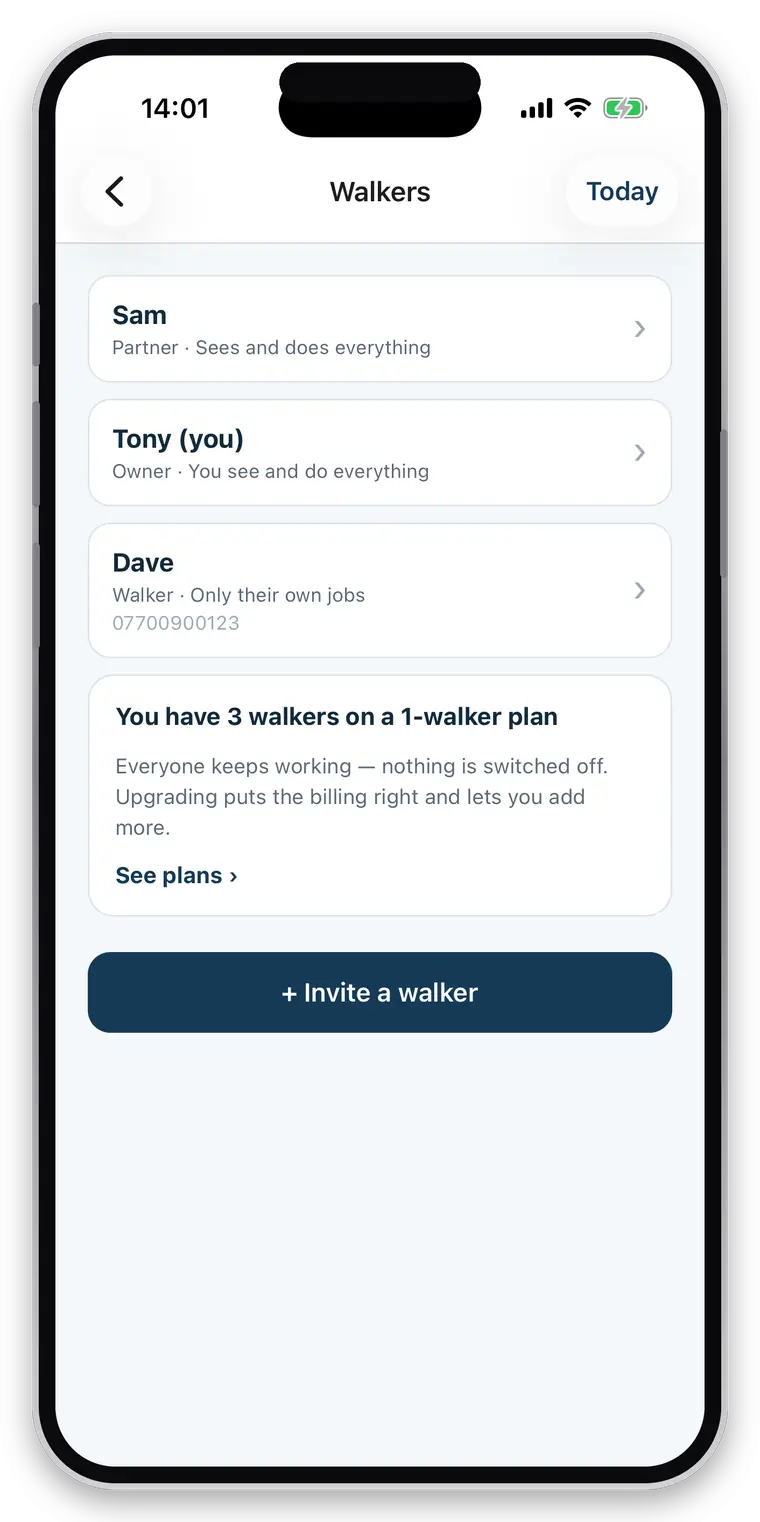
Solo by default
With one walker the team screen says “just you” and the assignment picker does not appear.
Full-access partners
The couple running a round together: same clients, same schedule, same invoices.
Restricted employees
Their own login, with only what you allow.
Permission controls
Clients, schedule, editing and money are each separately grantable.
Per-pet visibility
An employee sees the clients they have a booking for, and not the rest of your book.
Enforced in the database
Row-level security on every read and write, not buttons hidden in the interface.
Invites
A code you read out, with the seat check applied when it is claimed.
Walk attribution
“Dave walked Bella today” on the report, and in your own history.
Offline-first recording
Built for a park with one bar and a phone on 12%.
Phone first
Every tap is written to the device before anything else happens, and reported as done because it is.
A durable queue
Work waits across app kills and phone restarts until it has been sent.
Ordered sending
Oldest first, so a photo never arrives before the walk it belongs to.
Cached reads
Your clients, schedule and invoice list are readable from the phone when there is nothing to read them from.
Honest failure
A row the server genuinely refuses is reported rather than retried forever behind everything else.
One exception, stated
Creating an invoice needs a connection, because invoice numbers are issued centrally and must not have gaps.
What CorePaw Pro does not do yet.
Most software marketing describes an ambition and lets you find out later. This is the list of things people ask for that are genuinely not in the app today. Some are planned, some are deliberately deferred, and none of them appear anywhere else on this site as if they were finished.
Considered, not yet built
- Route optimisation and pickup-order planning
- Calendar synchronisation with Google or Apple calendars
- Drag-and-drop schedule planning
- Weekly and monthly pet digests for owners
- Video reports and voice notes
- Weather on the dashboard
Deliberately not built
- Prepaid packages, credits and credit notes
- Payroll, mileage, expenses and profit reporting
- Accounting integrations (Xero, QuickBooks)
- A public client portal or marketplace
- Reviews, star ratings and verification badges
- Live in-progress tracking of a walker by an owner
- Certificate verification — uploading a document is not the same as checking it
If one of these decides whether the app works for you, say so — it is genuinely how the order gets set.
About the feature list
Is there a limit on clients or pets?
No. Unlimited clients, unlimited pets, unlimited bookings and unlimited walks on every plan. You pay by how many walkers your business has, never per client or per animal — capping the size of your client book to charge you more would be charging you for growing.
Does it work for pet sitters as well as dog walkers?
Yes. A job can be a route-tracked walk or a drop-in visit with no route at all, and the app uses the right word for it — a cat has a visit, not a walk. Sitters log feeding, litter, water, medication, photos and notes, and the owner gets the same written report a walk produces.
What happens when there is no signal?
The walk carries on. Everything you tap is written to your phone first and reported as done, because it is done — the queue empties itself when you come back into range. The one exception is invoicing, which needs a connection and says so, because invoice numbers are issued centrally and in order.
Can a failed report be resent?
Yes. Every report carries its delivery state — sent, failed, or no email address on file — and a resend button. That matters more than it sounds: a report that silently never sent is indistinguishable from one that arrived, and a walker should never find out from the client.
Does it warn me about booking conflicts?
Yes, when you create a booking it shows what else is already out over that slot. They are warnings, never blocks — a walker who wants seven dogs out at once is not asking your software's permission.
Which currencies are supported?
Twenty-seven, including sterling, euro, US and Canadian dollars, Australian and New Zealand dollars, Swiss francs and the Nordic and Central European currencies. The currency is stamped onto each invoice when it is issued, so changing yours later never rewrites what a past invoice claims to have charged.
Does CorePaw take a percentage of what my clients pay me?
No, and it never touches the money. The invoice is a document; your client pays you directly, into your account, by your link. There is no platform cut, no payout schedule and no third party sitting between you and your income.
The only test that counts is your own round.
Full access for 30 days, no card, unlimited clients and pets.
Full access for 30 days · No card · Unlimited clients and pets