From your first client to your first invoice, in seven steps.
Setting up takes an evening at most, and you can do it one client at a time. The parts that happen every day take seconds, because they happen on a doorstep.
Full access for 30 days · No card · Unlimited clients and pets
-
Create your business
Your business name, your logo, your address and the way you invoice — prefix, payment terms, VAT number if you are registered, bank details or a payment link. Everything in the app hangs off the business rather than off you personally, so a solo walker is simply a business of one and adding a partner later changes a setting rather than your data.
-
Add your clients and their pets
Contact details, address, pickup instructions, emergency contact and vet. Then the animal: photo, breed, age, sex, and the things that keep it safe for an hour — recall, whether it can go off the lead, how it is with other dogs, how it is handled. If the owner already uses CorePaw they can share the pet with you and you read what they chose to share. If they have never heard of it, you create the record yourself and it is waiting for them when they sign up.
-
Set your services and your recurring work
Your own service list — 30-minute walk, hour walk, group walk, drop-in visit, whatever you actually sell, at your prices. Then put the round in: most of a book is "every Tuesday and Thursday", so you set that pattern once and the rest of the year is in the diary. One-offs go in as they come.
-
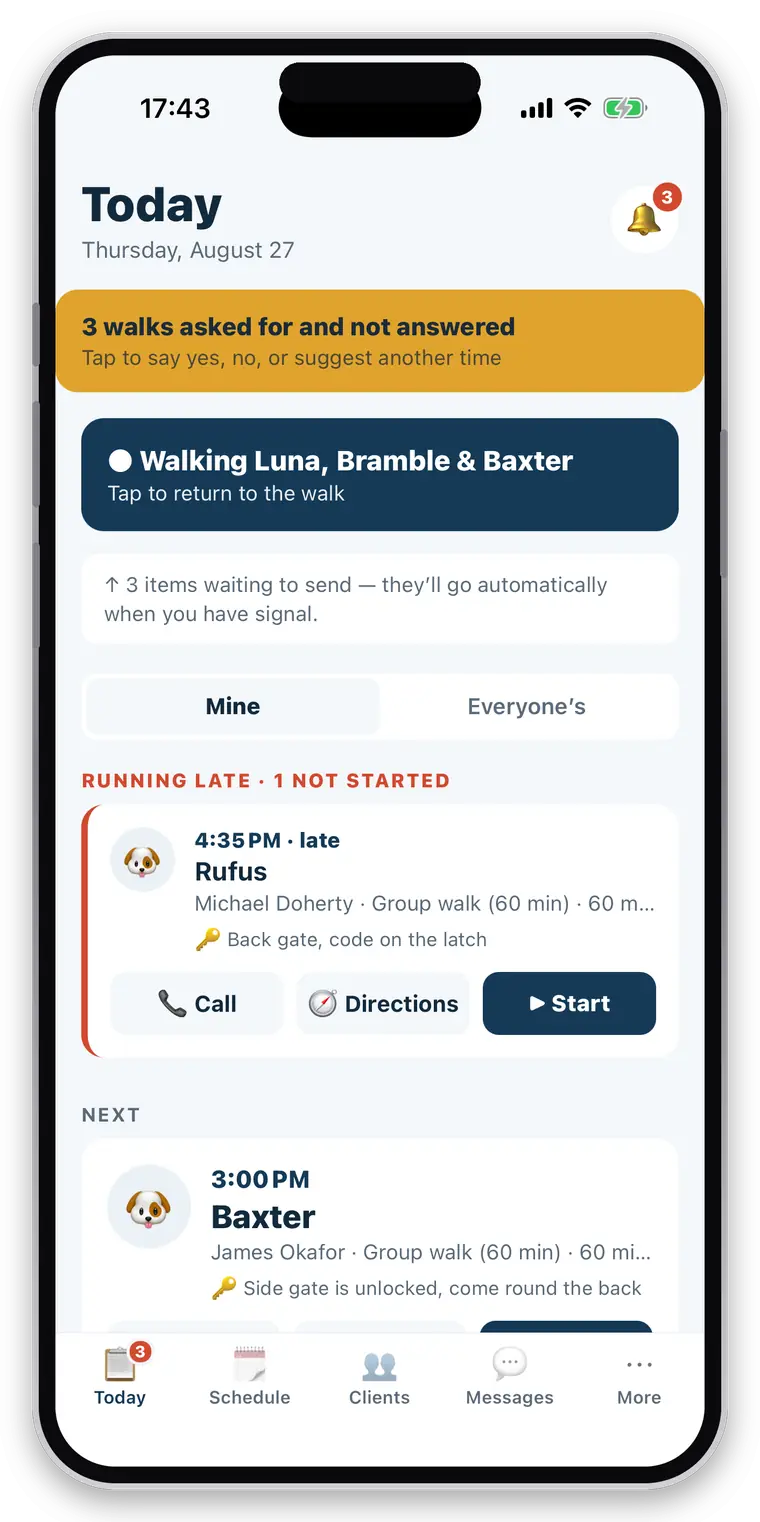
Follow Today
Open the app and the round is in front of you in the order you will do it, with anything running late at the top rather than in date order. Call the client, open directions or start the job without opening the booking. If a walk is already running it stays at the top until you finish it.
-
Record the walk or visit
Tap start and put the phone away. GPS keeps recording with the screen off. Log a water break, a wee, a treat, a photo, a note — for one dog or for all three at once. Pause when you stop; paused time and distance are not counted. A drop-in visit works identically without a route: fed, watered, litter, medication, photo, note.
-
Send the owner's report
Finish, and the report writes itself from the events you actually logged — never from anything nobody checked — and goes out with the route and the photos. The owner already had a notification when the dog was collected and another when it was home. Every report carries its delivery state, so a failed one is visible and resendable rather than silently missing.
-
Invoice the completed work
The work is already priced and waiting on the unbilled screen. At month end, run every client with unbilled work in one go: each gets a numbered, branded PDF with the walks as line items, VAT if you charge it, your bank details or payment link, emailed in your name. Mark payments as they arrive; switch on reminders if you would rather not chase.
Why it keeps working when the signal doesn’t.
The design decision underneath everything above: the phone is the source of truth during a job, and the server catches up afterwards.
The phone first
Every tap during a job is written to a database on the device before anything else happens, and reported as done — because it is done. No spinner, no “couldn’t save”, no signal required.
Then the queue
Work waits across app kills and restarts, and sends itself oldest-first when you are back in range — so a photo never arrives before the walk it belongs to.
Except invoice numbers
Creating an invoice needs a connection and says so. Numbers are issued centrally and in order, and a VAT-registered business must not have gaps in that sequence.
What about the clients you already have?
Most people start with the round they do on Monday and add the rest over a fortnight, because typing forty clients in one sitting is how a good tool gets abandoned in week one. If you already keep your book in a spreadsheet, you do not have to retype it: copy the rows and paste them into the import screen, and clients and pets come in together. It is safe to run twice — an existing client is matched and left alone rather than duplicated, so you can fix a column and paste again.
Your existing invoice numbering carries across: set your prefix and the next number, and the sequence continues where your spreadsheet left off rather than starting again at one.
Getting started
Is there a free trial?
Yes — 30 days with every feature switched on. Thirty days rather than the usual fourteen is deliberate: a walker's value lands twice, once on the first walk report and again at month end when the invoicing run saves an evening. A shorter trial ends before the second one arrives.
Is a card required to start?
No. No card, and nothing is crippled during the trial — a feature-limited version would tell you nothing about whether the app suits your round.
Can owners who already use CorePaw connect their pet?
Yes. An owner shares a specific pet with your business from CorePaw, and once you are connected they can add a second pet to the same relationship without a new code. You can also create a pet record for an owner who has never heard of CorePaw; when they sign up later, that record and its walk history are already waiting for them.
What happens when there is no signal?
The walk carries on. Everything you tap is written to your phone first and reported as done, because it is done — the queue empties itself when you come back into range. The one exception is invoicing, which needs a connection and says so, because invoice numbers are issued centrally and in order.
Can bookings repeat?
Yes. Most of a round is "Bella, every Tuesday and Thursday", so recurring bookings are there from the start rather than bolted on. Day and week views show what is coming, and Today lists the round in the order you will do it.
Can I create monthly invoices?
Yes. At month end, run the whole book at once: every client with unbilled completed work gets an invoice built from that work, with the walks and visits as line items. You are not rebuilding the month from a calendar and a group chat.
Is CorePaw Pro available on iOS and Android?
It is built for both — one app, released as its own iOS and Android listing. You can download it from the store links on this page.
Start with Monday’s round.
Full access for 30 days, no card. Add one day of work, run it through, and decide from that.
Full access for 30 days · No card · Unlimited clients and pets